

On-page SEO is the work you do on an individual webpage to make its purpose clear, satisfy the reader's intent, help search engines understand it, and provide a strong experience after the click. It includes visible content and the technical signals attached to that page.
How do you do on-page SEO?
Do the work in that order. There is little value in polishing a description while the page targets the wrong intent or points its canonical tag somewhere else.
What is on-page SEO?
On-page SEO covers the elements you can improve on a specific URL: content, title tag, meta description, headings, URL, canonical, internal and external links, images, structured data, mobile experience, and visible trust signals.
It differs from off-page SEO, which concerns signals beyond the page, and from site-wide technical SEO, although crawling, rendering, canonicalization, and performance overlap. Google's SEO Starter Guide emphasizes useful content, descriptive organization, crawlable links, and clear presentation rather than ranking tricks.
The complete on-page SEO workflow
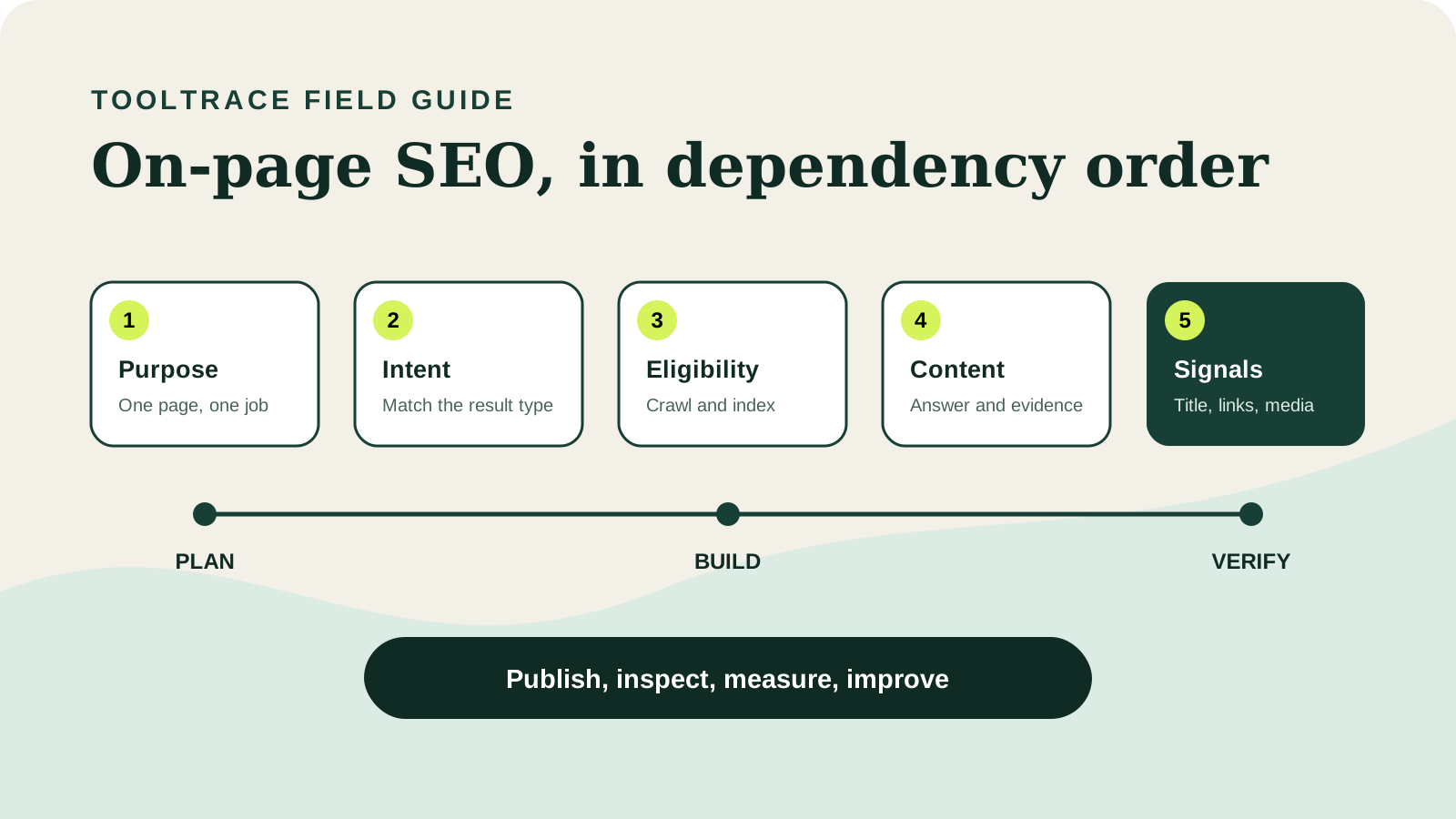
The following 19 steps are ordered by dependency. Complete foundational decisions before smaller presentation details.
1. Define the page's job
Write one sentence explaining what the page should help a specific visitor accomplish. It might teach a process, compare options, check a URL, explain an API, or complete a purchase.
Record four decisions before writing:
- Audience: who needs the page and what they already know.
- Task: the decision or action they should complete.
- Evidence: examples, data, experience, or sources needed to support the answer.
- Next action: what a satisfied reader should do afterward.
If the sentence contains several unrelated jobs, split the page or choose the primary one. A focused purpose makes content, titles, headings, calls to action, and internal links easier to align. It also prevents several pages from competing for the same intent.
2. Confirm the page can be crawled and indexed
Check the URL before rewriting content. A page can work for visitors while sending exclusion or duplication signals to search engines.
- The canonical URL returns HTTP
200without an avoidable redirect chain. robots.txtdoes not block the page or essential resources.- Meta robots and
X-Robots-Tagdo not contain an unintendednoindex. - The initial or rendered HTML contains the meaningful body content.
- The page has crawlable internal links pointing to it.
- The XML sitemap includes the canonical URL.
- The canonical points to the intended indexable version.
Inspect these signals with the free SEO Page Inspector, then use Google Search Console URL Inspection to compare your implementation with Google's observed state.
3. Match the dominant search intent
Review current results for the main topic and identify what users are trying to accomplish. Common intents are informational, commercial investigation, transactional, and navigational, but the expected page format matters too.
Record the recurring page type, depth, freshness, audience, and completion action. A query that consistently returns detailed tutorials probably needs a tutorial, while a query containing “checker” usually expects a working tool. Mixed results may indicate several legitimate sub-intents.
Do not copy headings or create a composite of competitors. Use the pattern to understand the job, then identify what the existing results omit: clearer steps, original evidence, a useful tool, more current sources, better examples, or a more specific audience.
4. Choose a primary keyword and map the topic
Select one primary phrase that accurately represents the page. Then collect related questions, entities, subtopics, and terminology needed to answer it naturally.
Build the map from search results, customer language, support conversations, product data, subject-matter expertise, and primary documentation. Separate must-answer concepts from optional adjacent topics. For “how to do on-page SEO,” related needs include intent, titles, headings, links, canonicals, image alt text, structured data, mobile checks, and measurement because they support the same task.
Do not create a separate thin page for every wording variation. One strong page can answer closely related phrases when they share the same intent. Create another URL only when the audience, task, expected format, or required depth is meaningfully different.
5. Do not chase a fixed keyword density
There is no universal percentage that makes a page rank. Repeating an exact phrase until a tool turns green can make writing unnatural and less useful.
Use the primary term where it accurately identifies the page, especially in the title, H1, introduction, and a relevant heading. Use related language where it improves precision. Read the copy aloud and remove sentences that exist only to repeat a phrase.
6. Choose a short, descriptive URL
Use a readable path that communicates the subject without unnecessary dates, parameters, folders, or repeated words. /blog/how-to-do-on-page-seo/ is clearer than a long automatic slug.
- Use lowercase words and a consistent hyphen convention.
- Avoid temporary campaign language for evergreen pages.
- Keep the URL stable when the title changes modestly.
- Do not include a year unless the page is genuinely year-specific.
Do not change an established URL only to shorten it. If a change is necessary, send the old address to the closest equivalent with a permanent redirect, update important internal links and canonicals, and keep the redirect in place.
7. Build the outline around the reader's task
Arrange sections in the order a person needs them. Start with the direct answer, define unfamiliar concepts, present the process by dependency, show examples, address mistakes, and finish with a checklist or next action.
For each proposed heading, ask whether it helps the reader make a decision, perform a step, avoid an error, or verify the outcome. Merge headings that repeat the same answer. Move prerequisites before dependent actions.
Use search results, customer questions, support requests, sales calls, and first-hand experience to find missing sections. Do not add headings merely because a competitor used them, and do not fragment one explanation into many shallow sections to make the article appear longer.
8. Answer the main question early
Place a concise answer near the top so readers can confirm the page matches their need. The introduction should establish scope and value, not delay the answer with a broad history.
A useful opening normally states the outcome, the major stages, and an important limitation. It should be specific enough to stand alone but short enough that the detailed process remains easy to reach.
An answer-first opening also creates a clear summary that search and AI retrieval systems can understand without misrepresenting the full article. Do not write an artificial “snippet” that contradicts the nuance explained later.
9. Be comprehensive, not merely long
Comprehensive content covers the decisions, steps, evidence, exceptions, and next actions needed to complete the page's job. Length by itself is not quality.
- Explain prerequisites before implementation.
- Show what a correct result looks like.
- Document common failure states and how to diagnose them.
- State exceptions, uncertainty, and boundaries.
- Provide a verification method and next action.
Remove paragraphs that repeat a point. Add detail where a reader could make a costly mistake. A definition may need 500 words; an implementation guide may need several thousand. Stop when the task is complete, not when an arbitrary word count is reached.
10. Add information gain
Give the page something competing summaries cannot reproduce: original data, tested examples, screenshots, diagrams, templates, expert experience, failure cases, or a decision framework.
Useful additions include a before-and-after example, real Search Console evidence, a benchmark with a stated test set, a downloadable checklist, screenshots of the workflow, or observations from operating the product. Explain how evidence was produced. A benchmark should name its conditions and date; a recommendation should state its limits.
Original does not mean unsupported opinion. Make the method understandable, distinguish observation from inference, and link to primary sources for facts you did not produce.
11. Write a clear title tag
Describe the page accurately and put differentiating information where users can see it. Keep titles distinct and avoid boilerplate that overwhelms the topic.
- Name the subject and useful outcome.
- Match the actual page instead of promising unsupported breadth.
- Place important distinguishing words before repetitive brand text.
- Review how the title reads when truncated, but do not treat a character count as a ranking rule.
Google may generate title links from several signals, but a useful <title> remains important. Follow Google's title-link guidance and inspect focused metadata with the Meta Tag Checker.
12. Use one clear H1 and useful subheadings
The H1 identifies the main subject. H2 and H3 headings should describe the questions, decisions, or stages beneath it. Use levels for hierarchy, not merely styling.
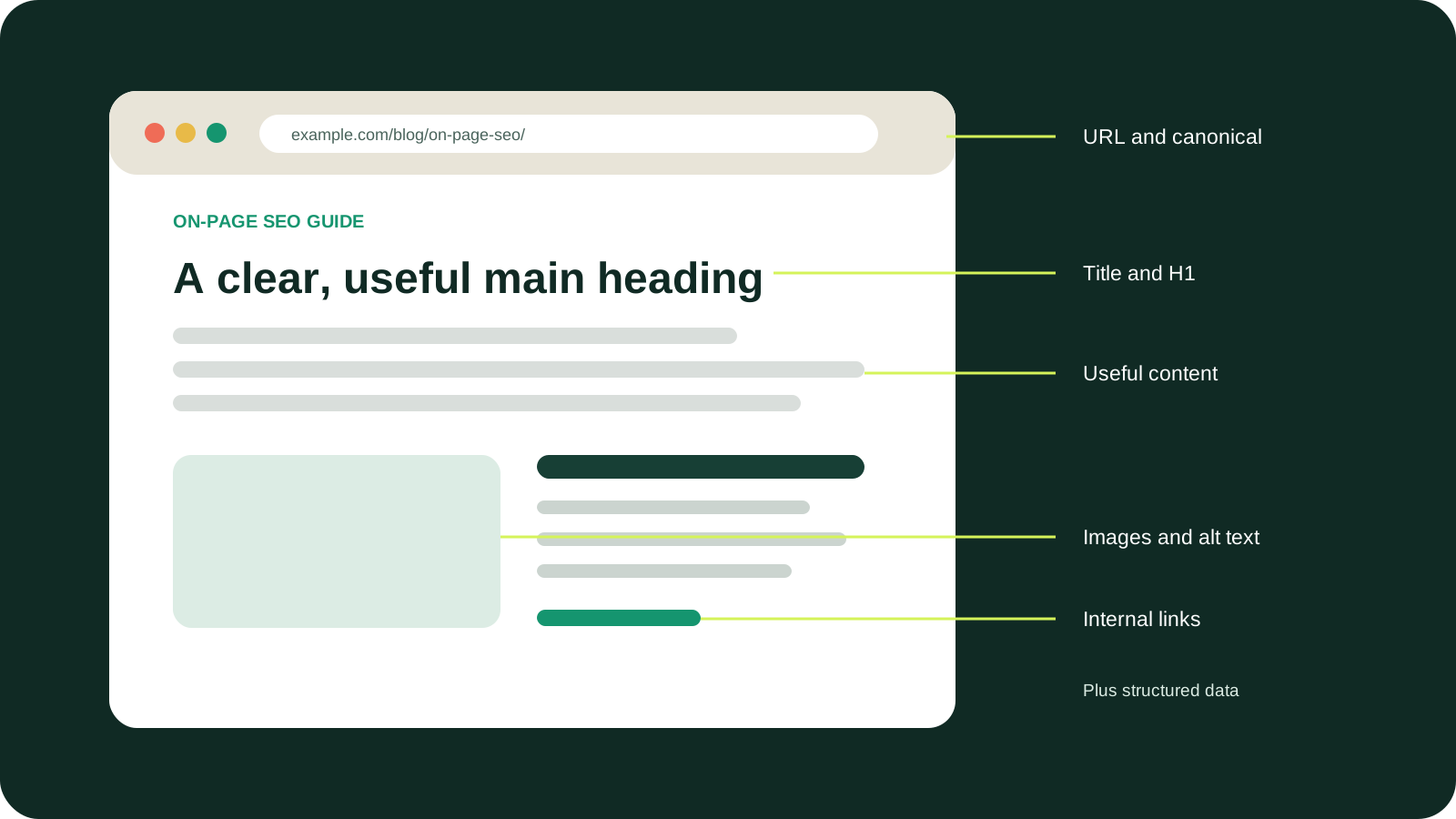
Readers should understand the structure by scanning headings. Avoid vague labels such as “More information” when a descriptive heading is available.
13. Write a useful meta description
Summarize the page accurately and give a searcher a reason to choose it. State the task, useful scope, and distinguishing value in natural language. Write unique descriptions for important pages and avoid lists of keywords.
A good description for this guide could explain that it covers intent, indexability, content, titles, links, schema, images, and measurement in dependency order. It should not promise guaranteed rankings.
Google primarily creates snippets from page content and may use the meta description when it better represents the page. See Google's snippet documentation.
14. Add helpful internal and external links
Internal links help readers continue a task and show how related pages connect. Add links from this page to relevant tools, documentation, products, and supporting guides, then add contextual links from existing pages back to the new URL.
- Use anchors that describe the destination.
- Place links where a reader naturally needs the next resource.
- Prefer crawlable
<a href>links over scripted navigation. - Repair broken links and unnecessary redirect chains.
- Avoid adding the same promotional link to every paragraph.
Use external links when a primary source, standard, or research paper supports a factual claim. Check that it still supports the statement. Google's link guidance explains crawlable links.
15. Optimize images and alternative text
Use images that explain, demonstrate, or prove something. Compress them, choose suitable dimensions and formats, specify width and height, lazy-load below-the-fold media, and keep essential text in HTML.
- Use descriptive filenames and modern formats where supported.
- Crop the asset to the displayed purpose instead of shipping unused pixels.
- Provide responsive sizes when the same image serves several viewports.
- Keep diagrams readable on mobile and prevent labels from leaving their containers.
- Add a caption when the source or meaning is not obvious.
Write alt text that describes useful content in context. Decorative images can use empty alt text. Do not force the keyword into every image. Review Google's image SEO guidance.
16. Check the canonical URL
The canonical identifies the preferred version of a duplicate or near-duplicate page. Use a self-referencing canonical on a unique page unless another URL genuinely represents the primary version.
Confirm the canonical is absolute, successful, indexable, and present in rendered HTML. Do not point several unrelated pages to one broad page to hide duplication. Keep canonicals consistent with redirects, internal links, sitemaps, and language signals.
After indexing, compare the user-declared and Google-selected canonical in Search Console. A different selection is evidence to investigate duplication and conflicting signals, not a reason to add more canonical tags. See Google's canonicalization guidance.
17. Add relevant structured data
Add schema only when a supported type describes visible information. Examples include Article, BreadcrumbList, Product, SoftwareApplication, and Organization.
Use stable absolute identifiers, connect related entities, and generate markup from the same data as the visible page. Dates, prices, authors, ratings, FAQ answers, and availability must not contradict what readers see.
Schema can support eligible features but cannot guarantee them. Check parsing and extracted entities with the Schema Markup Checker, validate vocabulary with Schema.org, and test supported Google features with Rich Results Test. Follow Google's structured-data guidelines.
18. Check mobile usability and page experience
Review the production page on a narrow screen, not only in a design canvas.
- Text remains readable without zooming.
- Navigation, forms, and tap targets are usable.
- Tables, code, diagrams, and images do not create page-wide horizontal scrolling.
- Sticky elements do not cover headings or controls.
- Primary content and metadata remain equivalent across devices.
- Layout shifts do not move controls while a user is interacting.
Improve loading by compressing images, serving appropriate dimensions, reserving media space, reducing render-blocking work, and avoiding unnecessary scripts. Test Core Web Vitals with field data where available. Do not remove useful content merely to chase a perfect laboratory score.
19. Publish, measure, and improve
Publishing is not the end of the process. After release:
- Add the canonical URL to the XML sitemap.
- Link to it from relevant existing pages.
- Inspect the URL in Google Search Console.
- Request indexing when appropriate.
- Confirm the selected canonical and rendered content.
- Monitor impressions, queries, clicks, click-through rate, engagement, and conversions.
- Review real user behavior and support feedback.
- Update the page when information, products, evidence, or intent changes.
If impressions grow but clicks remain low, review the title and snippet. If the page appears for irrelevant searches, make its purpose clearer. If it receives no impressions, investigate indexing, internal links, intent alignment, topical relevance, content value, and authority before adding more keywords.
Do not make constant minor edits merely to display a recent date. Update the content itself, then record an honest review date.
Common on-page SEO mistakes
Optimizing the wrong page type
A product page will rarely satisfy a query that consistently returns detailed tutorials. Match the format to the task instead of forcing a keyword onto the nearest existing URL.
Repeating the exact keyword
Keyword repetition does not compensate for weak information. Use natural terminology and spend the effort on evidence, examples, clarity, and task completion.
Treating character counts as ranking rules
Title and description lengths affect presentation, but fixed limits are not universal ranking requirements. Review the actual wording and likely display.
Writing for a plugin score
A green score can confirm that detectable fields exist. It cannot judge originality, accuracy, experience, intent satisfaction, or whether a page deserves to rank.
Ignoring indexability and canonicals
A polished title cannot help a page that is blocked, redirected incorrectly, marked noindex, or canonicalized elsewhere.
Publishing overlapping pages
Several URLs targeting the same primary intent can compete and split internal signals. Give each page a distinct job or consolidate them.
Adding unsupported schema
Structured data must represent visible content. More entities and properties are not automatically better.
Forgetting inbound internal links
A new page needs relevant links pointing to it, not only links leading away from it. Update established hubs and related articles when publishing.
Publishing without a next action
Help readers apply what they learned with a relevant tool, template, product, guide, or verification step.
On-page SEO checklist
Before publishing, confirm that:
- The page has one clear job and matches search intent.
- The URL returns HTTP
200and can be indexed. - The canonical identifies the intended primary URL.
- The primary topic is used naturally without forced density.
- The answer appears early and the outline follows the reader's task.
- The content is complete, accurate, and contributes original value.
- The title, H1, description, and headings describe the same purpose.
- Internal links help users continue and external sources support claims.
- Images are useful, compressed, dimensioned, and accurately described.
- Structured data matches visible content.
- The page works on mobile without overlap or horizontal scrolling.
- Analytics and Search Console can measure the result.
Frequently asked questions
How often should on-page SEO be updated?
Review a page when its information, product, sources, search intent, or performance changes. Important commercial and time-sensitive pages deserve more frequent checks.
What is the most important on-page SEO factor?
Begin with a crawlable, indexable page that satisfies a clear intent, then support it with useful content and consistent signals.
What is a good keyword density?
There is no universal target. Use the topic naturally and remove repetition that does not help the reader.
How long should an SEO article be?
Long enough to complete its job without padding. The necessary length depends on the subject, intent, evidence, and audience.
Can good on-page SEO guarantee rankings?
No. It improves relevance, accessibility, and usefulness, but results also depend on competition, site quality, external signals, and search systems.
Apply the guide
Inspect the page you are optimizing
Check the title, description, canonical, headings, indexability, image alt text, social metadata, and structured data in one evidence-led report.
Open the free SEO Page Inspector. Preparing content for AI discovery too? Continue with the LLM and AI search optimization guide.