

A site's structure makes sense to a person with a browser and rather less sense to a language model working from raw HTML. Navigation, cookie banners, and template chrome bury the handful of pages that actually explain what you do. The llms.txt convention is a response to that: one Markdown file at your site root that says who you are and which pages are worth reading.
# heading naming your site, a > blockquote summarising it in one sentence, then ## sections listing your important pages as Markdown links with a short description after each. Publish it at https://yoursite.com/llms.txt.This guide covers the format precisely, but the format is the easy part. The work that makes an llms.txt file useful is deciding what to leave out.
What an llms.txt file actually is
The proposal, published at llmstxt.org, describes a file at /llms.txt written in Markdown, structured so it can be read reliably by both people and machines. It contains a name, a summary, and curated links with descriptions.
The important word is curated. It is not a list of every URL you have. It is the shortlist you would hand to someone who had thirty seconds to understand your site, which is a different document from a sitemap and serves a different purpose.
Three files now sit at the root of a well-configured site, and they do not overlap:
| File | Question it answers | Read by |
|---|---|---|
robots.txt | What may a crawler fetch? | Crawlers, before fetching |
sitemap.xml | What URLs exist here? | Search engines, for discovery |
llms.txt | What matters here, and why? | Systems that choose to read it |
Notice that llms.txt grants nothing and forbids nothing. It cannot open a page that robots.txt blocks, and it cannot keep anyone out. It is descriptive, not permissive.
Is creating an llms.txt file worth it?
An honest answer, because the topic attracts a lot of overstatement.
Google has stated that it does not use llms.txt as a ranking or inclusion signal, for Search or for its AI features. No major search engine has committed to reading it. Adoption today is strongest among documentation platforms and developer tools, where several products fetch it deliberately.
So it is not an SEO requirement, and any guide promising rankings from it is selling something. What it does offer is cheap and real:
- Tools that do read it get an accurate, self-authored description instead of guessing from your homepage.
- Writing one forces you to decide which twenty pages matter, which is a genuinely useful exercise.
- It costs an hour once and a few minutes per quarter to maintain.
Treat it as a small, low-risk bet on a convention that may become standard, not as a growth lever. Get your pages crawlable and your content useful first: an llms.txt file pointing at thin pages just helps a model find thin pages faster.
The llms.txt format
The structure is deliberately minimal. Four elements, in this order.
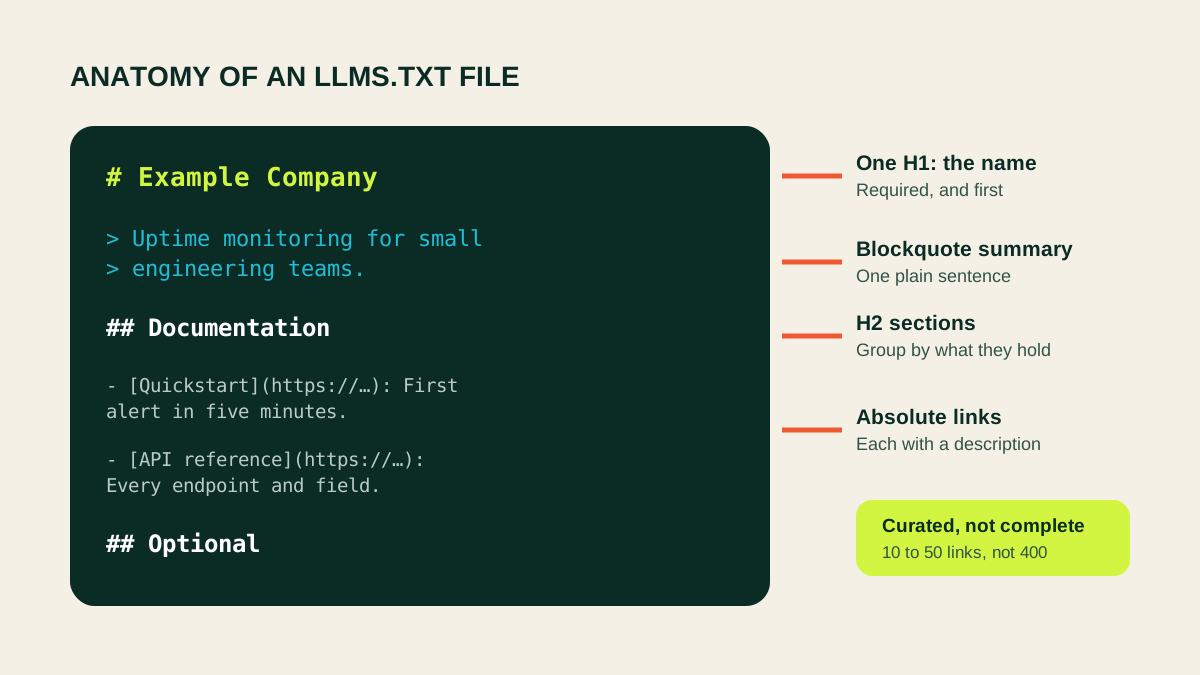
1. An H1 with the site or project name. Exactly one, and it must come first. This is the only strictly required element.
2. A blockquote summary. One sentence, starting with >, saying what the site is. This is the line a model reads first and the one most often skipped.
3. Optional context. A short paragraph or two after the summary, for anything a reader needs before the links make sense.
4. H2 sections containing links. Each link is a Markdown list item, and a colon followed by a short description turns a bare URL into something useful.
# Example Company

> Example Company builds uptime monitoring for small engineering teams.

We publish our API reference, integration guides, and pricing openly.

## Documentation

- [Quickstart](https://example.com/docs/quickstart): Create a monitor and receive your first alert in five minutes.
- [API reference](https://example.com/docs/api): Every endpoint, parameter, and response field.

## Product

- [Pricing](https://example.com/pricing): Plan limits and per-check costs.
One section name carries special meaning. A final ## Optional section marks links that can be skipped when a reader needs to be brief, which is a useful way to include secondary material without diluting the list.
Creating the file step by step
Step 1: Choose the pages
Start from what someone would need in order to understand and use your site. For most businesses that is:
- Documentation entry points and the API reference.
- Pricing, and anything explaining how the product is bought.
- The two or three guides that best demonstrate what you know.
- An about or contact page, so the entity behind the site is identifiable.
Leave out tag archives, pagination, near-duplicate landing pages, and anything you would not send to a customer. If a page is not good enough to link in an email, it is not good enough for this file.
Step 2: Write the name and summary
The H1 is your site or product name, nothing more. The blockquote is one sentence that answers what this is and who it is for. Write it plainly: this is the wrong place for positioning language.
Weak: > The leading platform for next-generation solutions.
Better: > Uptime monitoring and alerting for small engineering teams.
Step 3: Group into sections
Three to six H2 sections is usually right. Name them for what they contain: Documentation, API, Guides, Product, Company. Sections are how a reader decides which part of your site answers the question in front of it.
Step 4: Add links with descriptions
Every link needs an absolute URL. Relative paths are the single most common error in published files, and they break because the file is read away from your site.
Step 5: Review what you left out
Read the list as if you knew nothing about the company. If a question a customer always asks has no page to answer it, that is a content gap the file has just surfaced. Fix it in the file only if a good page exists; otherwise write the page.
A complete llms.txt example
This is the shape a finished file takes for a small software business.
# ToolTrace

> ToolTrace provides web scraping and page analysis APIs for developers and AI agents, plus free browser-based SEO tools.

All endpoints return structured JSON and share one credit pool. The free tools run the same analysis without an account.

## APIs

- [Web scraping API](https://tooltrace.io/apis/web-scraping/): Fetch any public page as HTML, text, or Markdown, with optional browser rendering.
- [Metadata extraction API](https://tooltrace.io/apis/metadata-extraction-api/): Titles, descriptions, canonical URLs, and Open Graph tags from any URL.
- [XML sitemap checker API](https://tooltrace.io/apis/xml-sitemap-checker-api/): Parse and validate a sitemap, including index files.

## Free tools

- [SEO Page Inspector](https://tooltrace.io/tools/seo-page-inspector/): Check titles, headings, canonicals, and metadata on any page.
- [AI Crawler Access Checker](https://tooltrace.io/tools/ai-crawler-access-checker/): See which AI crawlers your robots.txt allows.
- [llms.txt Generator](https://tooltrace.io/tools/llms-txt-generator/): Build an llms.txt file from your sitemap.

## Company

- [Pricing](https://tooltrace.io/pricing/): Credit costs per endpoint and plan limits.

## Optional

- [Blog](https://tooltrace.io/blog/): Guides on scraping, extraction, and technical SEO.
Writing descriptions that earn their place
The descriptions are what separate an llms.txt file from a list of links, and they are the part most often left empty.
A description should say what the reader will find, in the concrete terms someone would use when searching for it. Compare:
- Weak:
Our API documentation. - Better:
Every endpoint, parameter, and response field, with curl and Python examples.
The second version contains the words someone would actually be looking for. The first repeats the link text.
Keep them to one line. Two clauses at most. If a page needs a paragraph to explain, the page title is probably wrong.
llms.txt and llms-full.txt
The companion convention, llms-full.txt, contains the actual text of your key pages in a single document rather than links to them. A reader gets everything in one fetch instead of following twenty links.
The tradeoff is maintenance. A full file goes stale the moment a page changes, and it can grow large enough that reading it costs more than it saves. Generate it from your source content automatically or do not create it at all: a hand-maintained copy of your documentation will be wrong within a month.
For most sites, start with llms.txt alone. Add the full version only if you have a build step that can regenerate it.
Publishing and serving the file
Place the file so it resolves at https://yoursite.com/llms.txt. On a static site that means the public or root directory; on most frameworks it belongs next to robots.txt.
Three things to confirm after deploying:
- It returns HTTP 200, not a redirect chain and not your 404 page rendered with a 200 status, which is a surprisingly common failure.
- It is served as text, with a
Content-Typeoftext/plainortext/markdown. Some hosts guesstext/html, which makes the file harder to consume. - It is not blocked by a robots.txt rule, a firewall, or a bot-protection challenge.
Each host needs its own file. If your documentation lives on a subdomain, it needs a separate llms.txt; the apex domain's file does not cover it.
Publishing llms.txt on WordPress and common frameworks
The file has to be served as plain text from the root, which is easy on some platforms and fiddly on others.
WordPress. Upload llms.txt to the web root, usually public_html, by FTP or your host's file manager. Do not paste it into a post or page: WordPress would render it as HTML inside your theme, which fails the format check. Some SEO plugins now generate one for you, so look before adding a second.
Next.js. Put the file in public/llms.txt and it is served at the root untouched.
Astro, Hugo, Jekyll, Eleventy. Same idea: public/ for Astro and Eleventy, static/ for Hugo, the site root for Jekyll. Static site generators copy these through without processing, which is exactly what you want.
Shopify, Wix, Squarespace. These do not allow arbitrary files at the root, so a genuine /llms.txt is usually not possible. That is a real limitation rather than something to work around with a redirect, since a redirect to an HTML page defeats the purpose.
Whatever route you take, confirm the result: load the URL and check that you see plain text rather than your site's header and navigation.
Validate before you ship
The format is loose enough that a broken file still looks fine in a text editor. The failures that matter are structural: a missing H1, relative URLs, an HTML page served where Markdown was expected.
The free ToolTrace llms.txt Validator reads your published file and separates real errors from stylistic warnings, so you can see whether the file is broken or merely improvable. If you would rather not start from scratch, the llms.txt Generator builds a first draft from your sitemap and page metadata, which you then edit down.
Worth confirming by hand as well: every URL in the file resolves, and none of them is blocked in your robots.txt. Pointing a model at a page it is not allowed to fetch is a contradiction worth catching, and the robots.txt Tester will tell you in one check.
Common llms.txt mistakes
Relative links. [Docs](/docs) is meaningless to a reader that does not know your domain. Always absolute.
Listing everything. A file with four hundred links is a sitemap with worse formatting. Curation is the entire value.
No descriptions. Bare links force a reader to open each page, which is exactly the cost the file exists to remove.
Marketing language in the summary. The blockquote should identify the site, not sell it.
Serving HTML. If your framework renders the file through a page template, what gets served is a web page, not Markdown.
Writing it once and forgetting it. Links rot. Review the file whenever you restructure the site, and at least twice a year.
Expecting it to replace robots.txt. It controls no access at all. Both files, doing different jobs.
Frequently asked questions
What is an llms.txt file?
A Markdown file at the root of a site that names the site, summarises it in one line, and lists the pages most worth reading, each with a short description. It is a curated map for language models rather than a set of access rules.
Where does llms.txt go?
At the root of the host, reachable at https://example.com/llms.txt, served as text/plain or text/markdown. Every host needs its own file, so a documentation subdomain is separate from the apex domain.
Does Google use llms.txt?
Google has said it does not use llms.txt as a ranking or inclusion signal for Search or its AI features. Treat the file as optional and useful for systems that explicitly support it, not as an SEO requirement.
Is llms.txt a replacement for robots.txt or a sitemap?
No. robots.txt controls what a crawler may fetch and llms.txt does not grant or deny access. A sitemap lists every URL for machines; llms.txt deliberately lists only the important ones, with human-readable descriptions.
How long should an llms.txt file be?
Short enough to stay curated. Most sites are well served by 10 to 50 links grouped into a few sections. If it grows to hundreds of entries it has become a sitemap and has lost the point.
What is llms-full.txt?
A companion file containing the full text of your key pages in one document, rather than links to them. It saves a model from fetching each page separately, at the cost of a much larger file that has to be kept in sync.
Do I have to write llms.txt by hand?
No. A generator can read your sitemap and page metadata and produce a first draft in seconds. Editing that draft is almost always faster than starting from an empty file, and the curation still needs your judgement.
How do I know my llms.txt file is valid?
Check that it opens with a single H1, includes a blockquote summary, groups links under H2 headings, and uses absolute URLs throughout. The free ToolTrace llms.txt Validator reports errors and warnings against the published format.
Build yours
Generate a first draft, then edit it down
The fastest route to a good llms.txt file is a generated draft you then cut in half. Start from your sitemap, keep the pages you would send to a customer, and write one honest line about each.
Create an llms.txt file with the free generator or validate a file you already have.