

Both files are plain text. Both live at the root of your domain. Both are read by machines. That is where the similarity ends, and the confusion between them produces some genuinely counterproductive configurations.
robots.txt is permission and is checked before a crawler fetches anything. llms.txt is description and is read only by systems that choose to look for it. robots.txt can stop a page being read; llms.txt cannot make one readable.Put differently: robots.txt is the lock on the door. llms.txt is the note explaining which rooms are worth visiting. A note cannot open a locked door, and this is not merely an analogy, as the section on the contradiction below shows.
llms.txt vs robots.txt side by side
robots.txt | llms.txt | |
|---|---|---|
| Purpose | Controls what may be fetched | Describes what is worth reading |
| Status | Standardised in RFC 9309 | A proposal, adopted by some tools |
| Format | Directives: User-agent, Allow, Disallow | Markdown: heading, summary, links |
| Read by | Search and AI crawlers, before fetching | Systems that deliberately support it |
| Effect if absent | Everything is allowed | Nothing changes |
| Can grant access | Yes | No |
| Can deny access | Yes, by convention | No |
| Contains descriptions | No | Yes, and they are the point |
| Used by Google | Yes | No, per Google's own statements |
| Needed by every site | Effectively yes | No, optional |
What robots.txt does
robots.txt is the older and more consequential of the two. A crawler requests /robots.txt before fetching anything else on the host, and the rules there decide what it will request next.
It is standardised in RFC 9309, and three points from that specification explain most confusion:
- A crawler obeys exactly one group, the one whose
User-agentis the longest match for its name.*is a fallback, not a set of shared defaults. - Within that group, the longest matching path pattern wins, regardless of the order rules are written in.
- When an
Allowand aDisallowmatch at the same length,Allowwins. An emptyDisallow:matches nothing.
Two limits matter as much as the rules. It is a request, not enforcement: a crawler that ignores it faces no obstacle, so anything that must stay private needs authentication. And it does not remove pages from an index, because a disallowed URL can still be listed on the strength of links pointing at it, while the block makes any noindex on that page unreadable.
What llms.txt does
The llms.txt proposal addresses a different problem. A model reading raw HTML has to work past navigation, banners, and template chrome to find the few pages that explain what a site is. llms.txt hands it a curated shortlist instead.
The file names your site in an H1, summarises it in one blockquote line, then groups the pages that matter under H2 headings, each link followed by a short description. Nothing in it is enforceable. It is a self-authored description that a reader may or may not consult.
Adoption is uneven and worth stating plainly. Google has said it does not use llms.txt as a ranking or inclusion signal. No major search engine has committed to reading it. The tools that do read it are mostly AI developer products and documentation platforms. That makes it a low-cost bet rather than an SEO requirement, and anyone promising rankings from it is overselling.
What each file looks like
The formats have nothing in common, which is the clearest evidence they are not alternatives.
robots.txt is a list of directives:
User-agent: *
Disallow: /admin/
Disallow: /checkout/
Allow: /

User-agent: GPTBot
Disallow: /

Sitemap: https://example.com/sitemap.xml
llms.txt is a Markdown document:
# Example Company

> Uptime monitoring and alerting for small engineering teams.

## Documentation

- [Quickstart](https://example.com/docs/quickstart): Create a monitor and receive your first alert in five minutes.
- [API reference](https://example.com/docs/api): Every endpoint, parameter, and response field.
One is machine-readable permission. The other is prose with links. Note also that robots.txt is where you declare your sitemap, which is the only place these files reference each other at all.
The contradiction worth avoiding
Because the two files are read at different moments, it is entirely possible to publish a configuration that argues with itself.
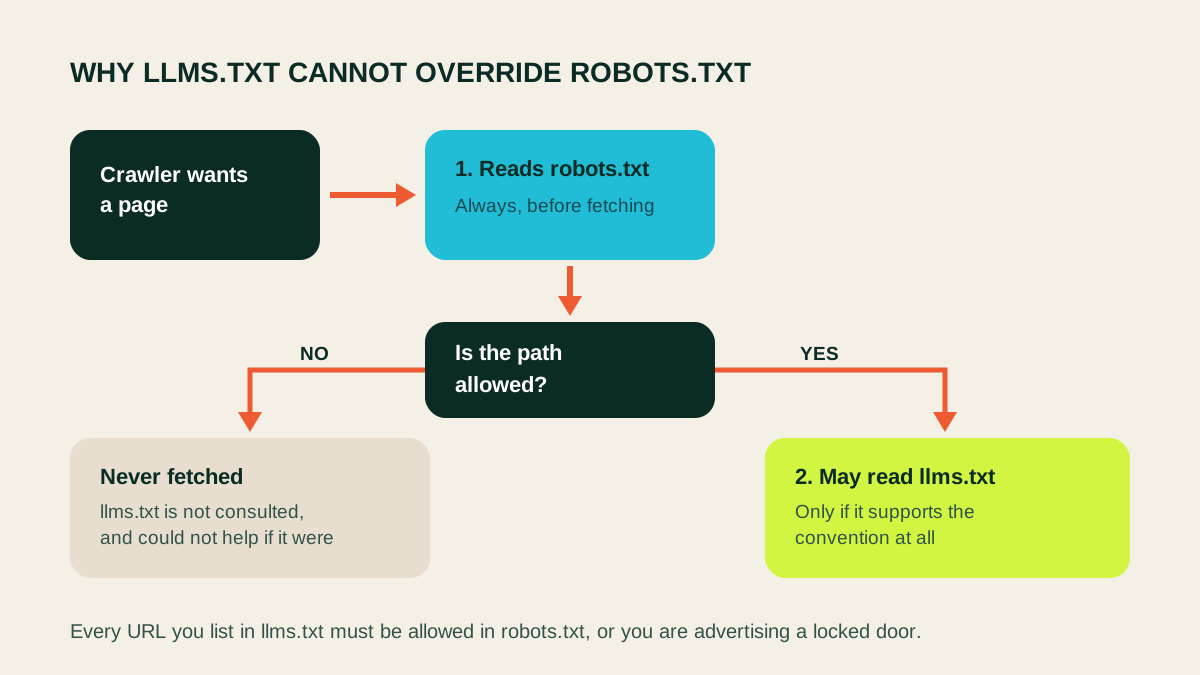
The common version: a site blocks AI crawlers broadly, having copied a block list from an article, and then publishes an llms.txt file inviting AI systems to read its best pages. The crawler checks robots.txt, finds itself disallowed, and never fetches anything. The llms.txt file is not read either, because it is a file on the same blocked host.
A subtler version: llms.txt lists a page that sits under a disallowed path. The file is read, the link is followed, the fetch is refused. All that has been achieved is publishing a URL nobody is permitted to read.
Both are easy to detect and easy to avoid. Before publishing an llms.txt file, confirm that every URL in it is crawlable by the crawlers you want reading it. The robots.txt Tester checks one path against one user agent and names the rule responsible; the AI Crawler Access Checker reports every major AI crawler at once.
Where sitemap.xml fits
A third file, and the one that clarifies what the other two are for. Together they answer three separate questions:
| File | Question | Audience |
|---|---|---|
robots.txt | What may I fetch? | Every crawler, before fetching |
sitemap.xml | What URLs exist? | Search engines, for discovery |
llms.txt | What matters, and why? | Systems that read it |
The difference between a sitemap and llms.txt is curation. A sitemap should list every page you want discovered, with no commentary. llms.txt should list a small fraction of them, each with a sentence explaining why it is there. A file with four hundred entries has become a badly formatted sitemap and lost its purpose.
Do you need both?
robots.txt: effectively yes. An absent file means everything is allowed, which is a valid position but an accidental one. Writing the intent down is how the next person to touch the site knows it was deliberate. You almost certainly have paths that should never be crawled, and you need somewhere to declare your sitemap.
llms.txt: it depends. Worth creating if you publish documentation or developer tools, if being described accurately by AI assistants matters commercially, or if your site structure buries the pages that explain what you do. Skip it if your site is a handful of pages that already say what they are, or if the pages it would point at are not yet good enough to point at.
An llms.txt file that indexes thin content simply helps a model find thin content faster. Fix the pages first.
How to ship both correctly
- Write robots.txt first. Block genuinely private paths, keep CSS and JavaScript crawlable, and declare your sitemap.
- Decide your AI crawler policy deliberately. Training crawlers and search crawlers are separate decisions; blocking the second removes you from AI answers.
- Test it. Google retired its robots.txt Tester from Search Console, so check a real URL against the live file for each crawler that matters.
- Publish your sitemap and confirm it is reachable and current.
- Then write llms.txt, listing only pages you would send to a customer, each with one honest line.
- Cross-check. Every URL in llms.txt must be allowed in robots.txt. This is the step that catches the contradiction.
- Validate the format, since a missing H1 or relative URLs will break a file that looks fine in an editor.
Then revisit both whenever the site is restructured. Root files are easy to write once and never look at again, which is how a staging rule ends up blocking a production site for a month.
Mistakes people make with both files
These two files fail quietly. Nothing errors, nothing alerts, and the cost only shows up in a report weeks later.
Treating robots.txt as security. It is a public document listing the paths you would rather nobody visited, which makes it an interesting read for exactly the wrong person. Anything genuinely private needs authentication, not a rule.
Blocking a page to remove it from search. A disallowed page cannot be fetched, so its noindex is never read, and the URL can stay listed on the strength of inbound links. Allow the crawl, serve noindex, and only block afterwards if crawl budget matters.
Assuming subdomains inherit. Every host serves its own copy of both files. A documentation subdomain with no robots.txt allows everything regardless of what the apex domain says, and it needs its own llms.txt too.
Adding a named crawler group without re-testing. The moment a crawler gets its own group it stops obeying everything under *. Whatever you protected there is open to it.
Letting llms.txt rot. Links break, pages move, products get renamed. A file that confidently describes a site as it was two years ago is worse than no file, because it is wrong rather than absent.
Serving llms.txt as HTML. If your framework routes the file through a page template, what reaches the reader is a web page with navigation, not Markdown.
Frequently asked questions
What is the difference between llms.txt and robots.txt?
robots.txt is permission: it tells crawlers which URLs they may fetch, and crawlers read it before requesting anything. llms.txt is description: it names your site, summarises it, and lists the pages worth reading. One controls access, the other offers guidance, and neither can do the other's job.
Does llms.txt replace robots.txt?
No. llms.txt grants no access and denies none. Removing robots.txt and publishing llms.txt would leave your site with no crawl rules at all.
Do I need both files?
Every site needs robots.txt, even if it only says everything is allowed. llms.txt is optional and most useful for documentation, developer tools, and businesses that want to be described accurately by AI assistants.
Which file do AI crawlers actually read?
Documented AI crawlers read robots.txt and the major operators state they honour it. llms.txt is read only by systems that have chosen to support it, mainly AI developer tools rather than search engines.
Does Google use llms.txt?
Google has said it does not use llms.txt as a ranking or inclusion signal. It remains useful for the tools that do read it, but it is not an SEO requirement.
Can llms.txt make a blocked page readable?
No, and this is the most common misunderstanding. A crawler checks robots.txt before fetching. If a page is disallowed, listing it in llms.txt changes nothing except to advertise a URL nobody is permitted to read.
How does sitemap.xml fit alongside them?
A sitemap lists every URL you want discovered, for machines, with no explanation. llms.txt lists only the important ones, with descriptions. They serve discovery and comprehension respectively.
What order should I create them in?
robots.txt first, because it is required and mistakes there are expensive. Then a sitemap. Then llms.txt, once the pages it would point at are actually worth pointing at.
Check both files
Make sure the two do not contradict each other
The files are cheap to write and easy to get subtly wrong. Confirm what your robots.txt actually permits, then confirm every page your llms.txt recommends can be fetched.
Validate your llms.txt file or test a URL against robots.txt.