

Every website now receives traffic from a category of visitor that did not exist a few years ago: crawlers operated by AI companies. Some are gathering text that may be used to train models. Others are fetching pages so an assistant can answer a question and cite a source. They arrive under different names, they serve different purposes, and a single rule in your robots.txt file decides what each one is allowed to read.
User-agent: GPTBot on one line and Disallow: / on the next. Repeat the pair for every crawler you want to restrict, because each crawler reads only one group.The mechanics take about five minutes. The decision behind them takes longer, and getting it wrong in either direction is expensive. Block too broadly and you disappear from the AI assistants that increasingly sit between people and the websites they would have visited. Block nothing and your work may be absorbed into products that never send a reader back. This guide covers both: the exact syntax, and how to decide what belongs in it.
What AI crawlers are and why the decision matters
An AI crawler is an automated client operated by a company building or running AI products. Like any crawler it requests pages over HTTP, identifies itself with a user agent string, and, if it follows the convention, reads /robots.txt before deciding what to fetch.
What makes AI crawlers different from a search engine crawler is the destination of the content. A search crawler traditionally fetches your page so it can be listed, and the listing sends a reader to you. Some AI crawlers fetch your page so a model can summarise it, and the reader may never arrive. That break in the old exchange, access in return for traffic, is why crawler policy became a live question for publishers rather than a technical footnote.
It is worth being precise about what is actually at stake, because the debate often blurs three separate things:
- Model training. Content may contribute to the corpus a future model learns from. There is no attribution and no referral.
- Retrieval for answers. A crawler fetches your page so an assistant can answer a live question, usually with a link. This is the closest analogue to search.
- User-triggered fetching. Someone pastes your URL into an assistant and it fetches that page on their behalf, much as a browser would.
These deserve different answers, and robots.txt is granular enough to give them different answers, because the companies involved use different user agent names for each job.
Training crawlers and search crawlers are not the same
This is the single most important distinction in the topic, and the one most often missed. When people block AI crawlers with a broad rule copied from a blog post, they frequently remove themselves from AI search at the same time, which is rarely what they intended.
OpenAI operates GPTBot, which it documents in connection with potential model training, and OAI-SearchBot, which it documents as the crawler that finds and surfaces pages in ChatGPT search. Those are separate switches. A publisher can decline to contribute to training while remaining eligible to be cited and linked in answers. OpenAI's own publisher FAQ recommends allowing OAI-SearchBot for anyone who wants their pages included in ChatGPT search results.
Google draws a similar line differently. Googlebot crawls for Google Search. Google-Extended is not a crawler at all but a control token governing whether already-crawled content may be used in certain Google AI products. Disallowing Google-Extended does not remove a single page from Google Search, a point worth repeating to anyone nervous about touching their file.
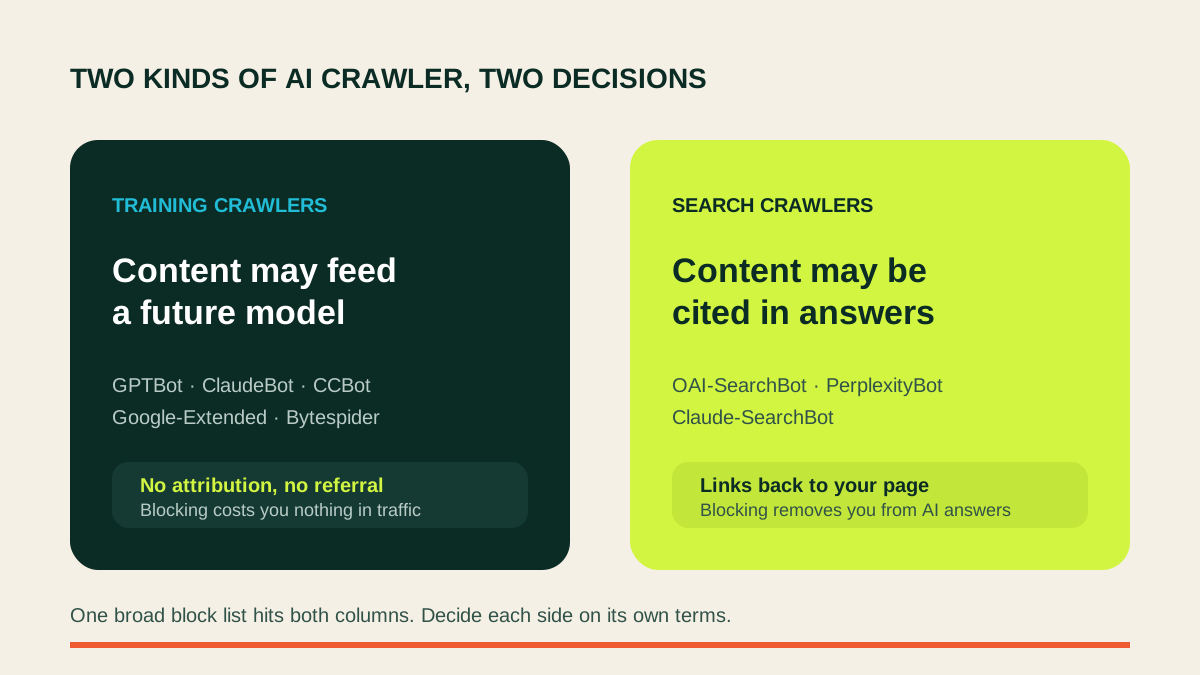
The practical consequence: before you block AI crawlers, sort the list into the ones that may feed training and the ones that put a link in front of a person. Most sites want to be strict with the first group and permissive with the second.
The AI crawler user agent reference
These are the documented user agent tokens you are most likely to want a rule for. Names change and new crawlers appear, so treat this as a starting point rather than a permanent list, and check each operator's documentation before relying on a token.
| User agent | Operator | Primary purpose |
|---|---|---|
GPTBot | OpenAI | Crawling that may be used for model training |
OAI-SearchBot | OpenAI | Finding and surfacing pages in ChatGPT search |
ChatGPT-User | OpenAI | Fetching a page a user has asked about |
ClaudeBot | Anthropic | Crawling that may be used for model training |
Claude-SearchBot | Anthropic | Finding pages used in search results |
Claude-User | Anthropic | Fetching a page in response to a user request |
Google-Extended | Control token for certain Google AI products | |
PerplexityBot | Perplexity | Indexing pages so they can be surfaced and linked |
Perplexity-User | Perplexity | Fetching a page in response to a user request |
Applebot-Extended | Apple | Control token for generative model training |
Meta-ExternalAgent | Meta | Crawling that may be used for AI products |
Bytespider | ByteDance | Crawling associated with AI products |
CCBot | Common Crawl | Open web corpus widely used in training datasets |
Amazonbot | Amazon | Crawling for Amazon services including assistants |
CCBot deserves a note of its own. Common Crawl is not an AI company, but its archive is a common ingredient in training datasets, so allowing it while blocking every AI crawler by name leaves an obvious side door open.
How robots.txt rules actually resolve
Most broken crawler policies are not caused by choosing the wrong crawler. They are caused by misunderstanding how the file is read. RFC 9309 defines the behaviour, and three rules explain almost every surprise.
A crawler obeys exactly one group
A crawler finds the group whose User-agent value is the longest match for its own name and follows only that group. User-agent: * is a fallback used when nothing else matches, not a set of defaults that applies on top of a named group.
This causes the most common failure in the topic. If your file has careful rules under * and you then add a two-line group for GPTBot, GPTBot stops obeying everything under *. Any path you protected there is now open to it.
The longest matching path wins
Within a group, the most specific matching pattern decides, not the first or last written. Disallow: /private/ together with Allow: /private/press/ permits /private/press/release, because the allow pattern is longer.
Allow beats Disallow on a tie
When two rules match at exactly the same length, the allow wins. And Disallow: with nothing after it matches no path at all, which is the conventional way of saying everything is permitted.
Patterns support * for any sequence of characters and $ to anchor the end of a path, so Disallow: /*.pdf$ withholds PDFs without touching /report.pdf.html.
Four ways to block AI crawlers
Pick the one that matches your position, then adapt the crawler list from the reference table above.
1. Block every AI crawler
The strictest option. Appropriate for sites whose entire business is people reading the page: subscription publishers, paid research, membership content.
User-agent: GPTBot
Disallow: /

User-agent: OAI-SearchBot
Disallow: /

User-agent: ChatGPT-User
Disallow: /

User-agent: ClaudeBot
Disallow: /

User-agent: PerplexityBot
Disallow: /

User-agent: CCBot
Disallow: /

User-agent: Bytespider
Disallow: /

User-agent: Google-Extended
Disallow: /
Understand the cost before shipping this. You are opting out of being recommended, cited, or linked by AI assistants. For a business that wants to be found, that is a significant amount of shelf space to give up.
2. Allow everything
The default, and the right answer more often than the anxious tone of the discussion suggests. If you publish documentation, marketing pages, product information, or anything else where being recommended is the point, you want AI systems reading it.
No configuration is needed. An absent or empty robots.txt allows everything, though writing the intent down is clearer for whoever maintains the site next.
3. Selective: block training, allow search
This is the option most sites should choose. It declines to feed training corpora while staying eligible for citation in AI answers.
User-agent: GPTBot
Disallow: /

User-agent: ClaudeBot
Disallow: /

User-agent: CCBot
Disallow: /

User-agent: Google-Extended
Disallow: /

User-agent: Applebot-Extended
Disallow: /

User-agent: OAI-SearchBot
Allow: /

User-agent: Claude-SearchBot
Allow: /

User-agent: PerplexityBot
Allow: /
4. Partial: protect specific paths
Sometimes the issue is not the crawler but a section of the site. An archive, a members' area, a set of generated pages. Because each crawler obeys one group, the path rules must be repeated inside every group you care about.
User-agent: GPTBot
Disallow: /archive/
Disallow: /members/
Allow: /

User-agent: ClaudeBot
Disallow: /archive/
Disallow: /members/
Allow: /
What robots.txt cannot do
Three limits matter, and each one has caused someone a bad afternoon.
It is a request, not access control. The file is a public document that politely asks well-behaved clients to stay out. A crawler that ignores it faces no technical obstacle. The major AI companies state that their documented crawlers honour it, and it is the mechanism they point people to for opting out, but robots.txt is not a security boundary and never was. Anything that must not be read needs authentication.
It does not remove a page from an index. Disallowing a URL asks a crawler not to fetch it. It does not ask a search engine to forget the URL exists, and a blocked page can still be listed on the strength of links pointing at it. Worse, blocking a page makes any noindex directive on that page unreadable, so the block can make removal harder rather than easier. To keep a page out of an index, allow crawling and serve noindex.
It is not retroactive. Blocking a training crawler today does nothing about models already trained, and nothing about copies of your content republished elsewhere.
Common mistakes when blocking AI crawlers
Adding a named group that silently discards your wildcard rules. The failure described earlier, and by some distance the most frequent. After adding any named group, re-test the paths you thought were protected.
Blocking the search crawler along with the training crawler. Usually the result of copying a long block list without checking what each token does. This is how sites vanish from AI answers while believing they only opted out of training.
Blocking assets. Disallowing /assets/ or /static/ prevents renderers fetching the CSS and JavaScript a page needs, so the page is judged on a broken version of itself.
Assuming subdomains inherit. Every host serves its own robots.txt. Rules on example.com do nothing for docs.example.com.
A trailing slash that changes the meaning. Disallow: /admin also blocks /administrator. Disallow: /admin/ does not.
Treating the file as private. Your robots.txt is world-readable, and a list of the paths you would rather nobody visited is an interesting document to the wrong reader.
Verify the file before you trust it
A robots.txt file that looks correct and behaves differently is the normal outcome, not an unusual one, because the precedence rules are not intuitive. Google removed the robots.txt Tester from Search Console, so the obvious place to check is gone.
Test your live file against the specific crawlers you care about, one URL at a time. The free ToolTrace AI Crawler Access Checker reads your robots.txt and reports whether each major AI crawler is allowed, naming the rule and line responsible for every verdict. To check a single path against one user agent, use the robots.txt Tester.
Check these after any change:
- Your homepage, for each crawler you deliberately allowed.
- A page inside every section you meant to protect.
- Your CSS and JavaScript directories.
- Any path that was covered by a
*rule before you added a named group.
When robots.txt is not enough
If a crawler ignores the convention, the file cannot help. Enforcement happens where the request is served:
- CDN or WAF rules that match the user agent or the originating network and return a 403.
- Server configuration doing the same at the origin, useful when there is no CDN in front.
- Authentication, the only genuine boundary. Content behind a login is not available to any anonymous client.
Verify the user agent before acting on it, because a user agent string is self-reported and trivially forged. Operators publish IP ranges precisely so that a claimed identity can be checked. Blocking by name alone stops honest clients and no one else.
It is also worth watching your logs before changing anything. Crawler traffic is easy to imagine and easy to measure, and the real distribution across your site is often not what you assumed.
Choosing a policy for your kind of site
News and subscription publishing. The strongest case for restriction, because the value is the reader arriving. Block training crawlers; keep search crawlers if you still want the referral.
Documentation and developer tools. Allow nearly everything. When someone asks an assistant how to use a product like yours, being in the answer is the entire objective.
Ecommerce. Allow crawlers to read product pages. Withhold checkout, account, and internal search paths, which have no business being fetched by anyone.
Marketing sites and SaaS. Allow. Being recommended by an assistant is a marketing channel, and there is little training-corpus risk in a pricing page.
Original research and creative work. The case for blocking training crawlers is strongest here, since the work itself is the asset.
Frequently asked questions
How do I block AI crawlers in robots.txt?
Add a group naming the crawler and disallow the paths you want withheld, for example 'User-agent: GPTBot' followed by 'Disallow: /'. Each crawler needs its own group, because a crawler reads only the group that best matches its name.
Does blocking GPTBot remove my site from ChatGPT?
Not by itself. OpenAI documents GPTBot for potential model training and OAI-SearchBot for finding pages shown in ChatGPT search. Blocking GPTBot while allowing OAI-SearchBot is how publishers opt out of training while staying eligible for citation.
Will blocking AI crawlers hurt my Google rankings?
Blocking AI-specific crawlers such as GPTBot or Google-Extended does not affect normal Google Search indexing, which uses Googlebot. Blocking Googlebot itself would affect rankings, so keep the two decisions separate.
Do AI crawlers actually obey robots.txt?
The major AI companies state that their documented crawlers honour it, and robots.txt is the mechanism they point to for opting out. It is a request rather than an enforcement mechanism, so a crawler that ignores the convention needs blocking at the server, CDN, or WAF instead.
Should I block AI crawlers at all?
It depends on where your value sits. Publishers whose revenue depends on people arriving at the page often restrict training crawlers while allowing search crawlers. Businesses that want to be recommended by AI assistants usually allow both.
What is the difference between Google-Extended and Googlebot?
Googlebot crawls for Google Search. Google-Extended is a separate control token that governs use of already-crawled content for certain Google AI products. Disallowing Google-Extended does not remove pages from Search.
How do I check whether my robots.txt is blocking an AI crawler?
Test a specific URL against your live file for each user agent. The free ToolTrace AI Crawler Access Checker reports the verdict for every major AI and search crawler at once, and names the rule responsible.
Does blocking AI crawlers stop my content being used for training?
It signals an opt-out to crawlers that respect the convention and is the method AI companies document. It cannot retroactively remove content from models already trained, and it does not stop copies of your content held on other websites.
Check your policy
See which AI crawlers your site allows today
Crawler policy is only as good as its last test, and the precedence rules make quiet mistakes easy. Read your live file, confirm each verdict, and re-check whenever a named group is added.
Run the free AI Crawler Access Checker or browse all free website tools.